
An overview of ECS cloud Drive
What is Cloud Drive
EVS (Elastic Volume Service) can provide high reliable, high performance, rich specifications and elastic expandable block storage services for elastic cloud servers, which can meet the business requirements of different scenarios, and is suitable for distributed file system, development and testing, data warehouse, high performance computing and other scenarios.
Evs is similar to the hard disk in PC, which needs to be mounted to the cloud server for use, and cannot be used alone. You can initialize and create file system for the mounted cloud hard drive, and store data persistently on the cloud hard drive.
System disk: The cloud hard disk in which the operating system is installed in the cloud server, similar to the C disk in the computer.
The system disk is automatically purchased and mounted when the cloud server is purchased, and cannot be purchased separately. The maximum capacity of the system disk is 1024 GiB.
Data disk: The cloud hard disk used to store data in the cloud server, which is used to store other data besides the operating system, similar to the D disk, E disk, F disk in the computer.
The data disk can be purchased when purchasing the cloud server, and the system will automatically mount it to the cloud server. You can also buy a new cloud hard drive and mount it to the cloud server separately after purchasing the cloud server. A single cloud server can mount up to 8 data disks.
Types of cloud hard drives
We provide high performance and high IO SSD cloud hard disk, which is used with GPU cloud server.
Disk Operation Instructions
| Operating scenario | Operating instructions |
|---|---|
| Create data disk with ECS | The data disk can be configured to purchase at the time of the ECS purchase to automatically mount to the cloud server. After the purchase is completed, you need to log into ECS to initialize the data disk. Data disks created when purchasing ECS will have the same billing model as ECS. |
| New data disk (ECS console purchase) | Adding a data disk in the ECS console will automatically mount it to the cloud server. After the purchase is completed, you need to log into ECS to initialize the data disk. Data disks added through the ECS console will have the same billing model as ECS. |
| New data disk (purchased from EVS console) | Add a data disk in the EVS console, manually mount it to ECS, and then log in ECS to initialize the data disk. When the data disk added through the EVS console is mounted into ECS, its billing mode can be inconsistent with that of ECS. |
| Uninstall and delete the cloud drive | If you no longer need to use the cloud drive, you can uninstall and release the cloud drive to save money |
Mount the disk for the ECS
Operation scenario
After the elastic cloud server is successfully created, if the disk is not enough or the current disk does not meet the requirements, you can order a new data disk for the current cloud server. When ordering a data disk, you need to select the disk in the same area as the corresponding cloud server.
Constraints and Limitations
- Mounting disks for elastic cloud servers in "running" or "down" states is only supported.
- Once the elastic cloud server is successfully created, it supports mounting up to 8 disks.
- The system disk purchased with the package year/month cloud server can only be mounted to the original cloud server if it continues to be used as a system disk after being unloaded.
- The data disk only supports mounting for the specified server, so it is necessary to consider the purchase time and the corresponding server match when purchasing.
- The cloud hard disk in the frozen state does not support mounting to the elastic cloud server.
- Data disk and system disk are specified directly at the time of purchase, and do not support conversion between them
- When purchasing a data disk, select the specified instance, and it will be automatically mounted to the corresponding cloud server after successful purchase.
Figure 1 Mounting the data disk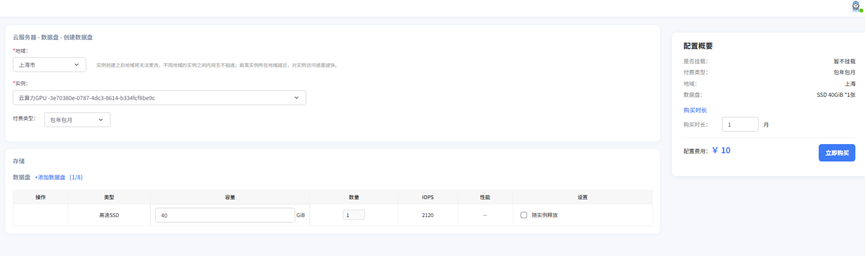 Instructions:
- If you do not have a cloud drive available, click "Create Data Drive" to the right of "Data Drive" in the console to purchase it.
Uninstall the data drive online
Operation scenario
Unmount the disk mounted in the elastic cloud server.
- For the data disk mounted on the disk bit of the data disk (not the /dev/sda mount point), the online unmount disk function is supported. At this time, the elastic cloud server is in the "running" state.