
Billing Instructions -OmniBot
Billing Overview
This article takes you to quickly understand the main billing information of OmniBot embodied intelligent service, such as billing mode, billing item, renewal and arrear.
Billing Model
OmniBot embodied Intelligence service includes a variety of service modes, each of which has a different billing method:
- Simulation service: Billing is based on the configuration of the provided simulation platform. Currently, only annual and monthly billing methods are available
- Training service: Billing is based on the used computing power resources, which provides two ways: fixed cycle billing and metered billing
- Data services: Currently, all data services are provided free of charge
- Model service: Model service is billed based on token usage
At present, all the payment methods are prepaid. If customers have other requirements, they can also contact us directly.
Billing items
Emulation services
The billing item of the simulation platform includes the configuration of the simulation platform, the cost of the data disk, the cost of the elastic public network IP and so on.
FIG. 1 Billing item of simulation service
| Billing item | Billing item description |
|---|---|
| Example Specifications | vCPU, memory, GPU card model, quantity, etc Price according to example specifications |
| Mirror | Public mirror, private mirror , Public image is currently provided, private image mode billing is not provided |
| Data disk charges (optional) | Charge based on data disk size , Provide local high-speed data disks, a single simulation environment can mount up to 8 data disks |
| Bandwidth | Each instance provides 5M public network bandwidth by default, and self-subscription is not provided |
| Flexible public IP charges | Allocate public IPV4 addresses , Default allocation, not independent subscription |
Training Services
The training service is charged based on the computing resources subscribed by the user:
| Item of charge | Billing item description |
|---|---|
| Computing power resources | GPU card model, number, etc Pricing is based on the model and number of GPU cards used |
Model Service
Model services
Renewal fees
When the service resource expires, it will affect the normal delivery of the service. If you want to continue to use the service resource, you need to renew the fee within the prescribed time, otherwise the related resource will be released automatically and the data may also be lost.
At present, the renewal only supports manual renewal. You can find the corresponding resource in the corresponding service and click "Renewal" to renew the selected instance.
Bill of Expenses
You can view the running and detailed bills related to OmniBot services in "Expense Center > Billing Management" in order to understand your consumption. See the Bill of Charges for detailed instructions.
Bill of Charges
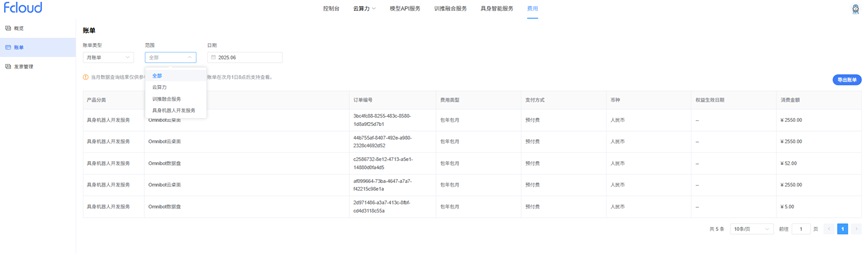
- Log into the Administrative console and select "Fees > Bills"
- Select "Monthly Bill" from "Billing Type"; And select the type of service in the "Range" option, and then select the date to query the monthly billing data
Notes on Arrears
For prepaid customers, the account balance is determined to be in arrears when it is less than the bill with settlement. After arrears, it may affect the normal operation of cloud resources, please recharge in time.
Impact of arrears
Users have already paid for resources in advance, so existing pack-year/pack-month resources can still be used normally in the event of account arrears. However, the user will not be able to perform the operations that involve fees, such as new purchase and renewal orders.
Avoid and deal with arrears
Prompt top-up is required after arrears, see Account Top-up for details. If the cloud server resources are no longer in use, you can delete them and the related resources bound to them, so as not to continue charging.
Billing FAQ
The subscription service is about to expire and I want to keep using it, what should I do?
A: The expiration of the subscription service will affect the normal operation of the service. If you want to continue to use the service, you need to renew the service resources within the specified time, otherwise the resources will be automatically released, and the data will be lost and unrecoverable.
Do you support reminders of account balance changes?
The system will send notifications of account balance changes to customers in the form of email and SMS, including account balance adjustment, recharge to the account, and customer online recharge, etc.